更新:2026-02-28 16:04:06
腾讯视频平台拥有海量视频资源,能为用户带来免费的观影享受。最近有不少新用户加入,他们大多不清楚如何开启腾讯视频的驻留权限。为此,小编整理了一份开启该功能的详细教程,感兴趣的朋友可以来了解一下!

第一步
启动软件后,点击界面右上角的三条横线图标。
IncompleteBody
You did not provide the number of byte (truncated...) IncompleteBody (client): You did not provide the number of bytes specified by the Content-Length HTTP header. -
IncompleteBody
You did not provide the number of bytes specified by the Content-Length HTTP header.
2025/1223/23120001qmm7q06pybxnkhnw.png
game-img
/game-img/2025/1223/23120001qmm7q06pybxnkhnw.png
1883BC55EAA7F525
37b62f02de360c6949659e1d2fb72852efb5d74e5dcbc7d4e665920a1c72a29e
">
第二步
然后点击下方选项列表里的“设置”。

第三步
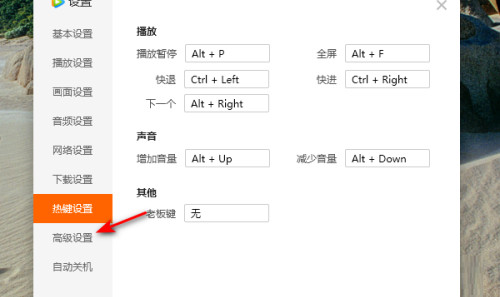
在弹出的窗口界面里,点击左侧栏的“高级设置”选项。
第四步
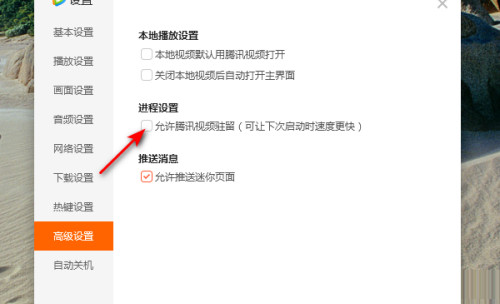
然后在右侧找到“允许腾讯视频驻留”这一选项,并把它勾选起来。
第五步
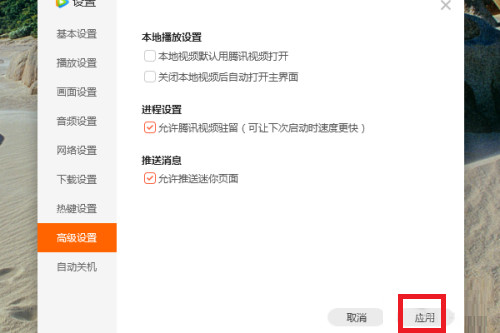
最后点击应用即可。