更新:2025-11-28 03:50:04
在《我的世界》这款游戏里,玩家能够借助指令代码,迅速达成各类功能。无论是独自畅玩的单人游戏,还是多人联机的服务器模式,指令都极具实用性。步入2025年,指令代码迎来了全新更新。究竟最新的指令都包含哪些呢?接下来,小编精心整理了《我的世界》2025年最新指令代码大全,大家一同来瞧瞧吧。

单机指令(部分多人也适用)
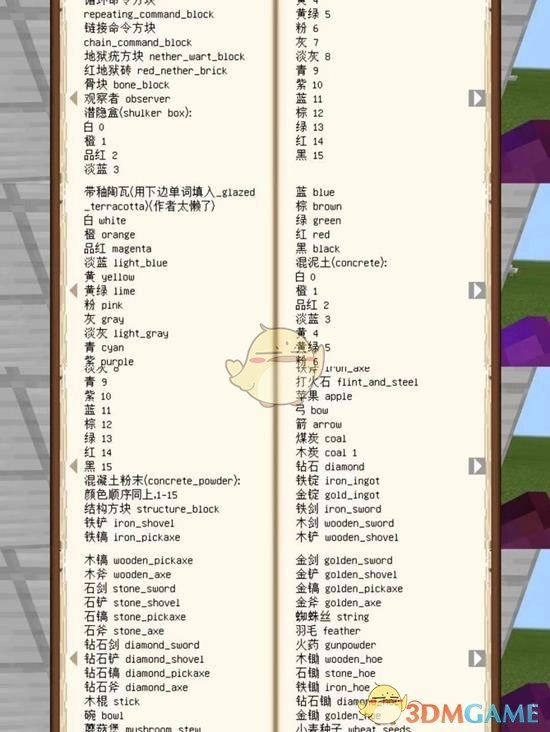
指令代码大全
指令功能描述
/gamemode 0切换到生存模式
/gamemode 1切换到创造模式
/gamemode 2切换到冒险模式
/gamemode 3切换到旁观模式
/gamerule keepInventory true死亡时不掉落物品
/gamerule mobGriefing false防止生物破坏方块
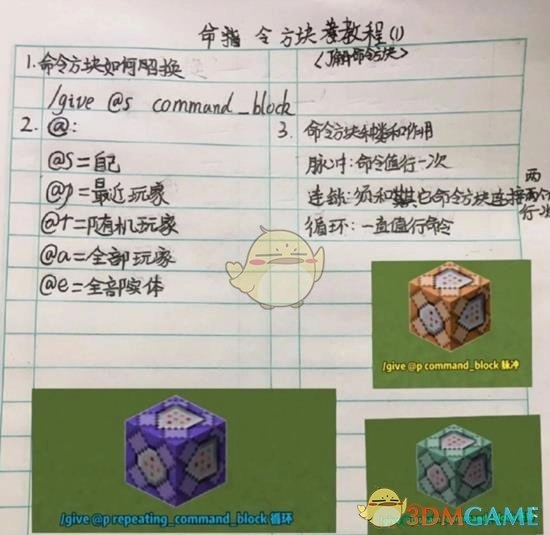
/give @s minecraft:command_block 用于给予玩家命令方块。
/spawnpoint @a设置所有玩家的重生点
/difficulty<0 - 3>设定游戏难度(0代表和平,1代表简单,2代表普通,3代表困难)
/weather clear清除天气效果
/kill @s自杀
/heal @s恢复玩家的生命值
/time set day设置时间为白天
/time set night设置时间为夜晚
/locate temple定位最近的神庙坐标
使用指令“/effect @s minecraft:regeneration 10 1”,可以给予玩家再生效果 。这条指令的作用是让玩家获得持续10秒、等级为1的再生效果,使玩家的生命值能够较快地回复 。
/clear @s清除玩家背包中的所有物品
/clone复制指定区域的方块到另一个位置
/fill填充指定区域的方块
/tp @s将玩家传送到指定坐标
/tp @s @a将玩家传送到其他玩家的位置
/particle生成粒子效果
/playsound@s播放音乐或声音效果
/say在聊天框中发送消息
/tellraw @s {"text":""}发送格式化消息
/scoreboard objectives add创建计分板
/advancement grant @s everything 赋予玩家全部成就
/bossbar create
/execute as @s at @s run以玩家身份执行命令
/experience add @s 10 levels给予玩家经验值
/enchant @s附魔玩家物品
/function运行函数
/data merge block{}修改方块的NBT数据
/data merge entity @s {}修改实体的NBT数据
/datapack enable启用数据包
/datapack disable禁用数据包
/debug start开始调试
/debug stop停止调试
/defaultgamemode设置默认游戏模式
/difficulty<0-3>设置游戏难度
/effect clear @s清除玩家身上的所有药水效果
使用指令“/effect give @s minecraft:strength 10 1”,能够为玩家赋予力量药水效果
/fill填充指定区域的方块
/function运行函数
/gamemode更改游戏模式
/gamerule更改游戏规则
/give @s给予玩家物品
/help显示帮助信息
/kill @s杀死玩家
/locate定位最近的建筑坐标
/me显示玩家的动作
/particle生成粒子效果
/playsound@s播放音乐或声音效果
/say在聊天框中发送消息
/scoreboard objectives add创建计分板
/advancement grant @s everything 赋予玩家全部成就
/bossbar create
/execute as @s at @s run以玩家身份执行命令
/experience add @s 10 levels给予玩家经验值
/enchant @s附魔玩家物品
/function运行函数
/data merge block{}修改方块的NBT数据
/data merge entity @s {}修改实体的NBT数据
/datapack enable启用数据包
/datapack disable禁用数据包
/debug start开始调试
/debug stop停止调试
/defaultgamemode设置默认游戏模式
/difficulty<0-3>设置游戏难度
/effect clear @s清除玩家身上的所有药水效果
使用指令“/effect give @s minecraft:strength 10 1”,能够为玩家赋予力量药水效果
/fill填充指定区域的方块
/function运行函数
/gamemode更改游戏模式
/gamerule更改游戏规则
/give @s给予玩家物品
/help显示帮助信息
/kill @s杀死玩家
/locate定位最近的建筑坐标
/me显示玩家的动作
/particle生成粒子效果
/playsound@s播放音乐或声音效果
/say在聊天框中发送消息
/scoreboard objectives add创建计分板
/advancement grant @s everything 赋予玩家全部成就
/bossbar create
/execute as @s at @s run以玩家身份执行命令
/experience add @s 10 levels给予玩家经验值
/enchant @s附魔玩家物品
/function运行函数
/data merge block{}修改方块的NBT数据
/data merge entity @s {}修改实体的NBT数据
/datapack enable启用数据包
/datapack disable禁用数据包
/debug start开始调试
/debug stop停止调试
/defaultgamemode设置默认游戏模式
/difficulty<0-3>设置游戏难度
/effect clear @s清除玩家身上的所有药水效果
使用指令“/effect give @s minecraft:strength 10 1”,能够为玩家赋予力量药水效果
/fill填充指定区域的方块
/function运行函数
/gamemode更改游戏模式
/gamerule更改游戏规则
/give @s给予玩家物品
/help显示
以上便是okok下载站精心整理呈现的《我的世界》2025年最全指令代码汇总。若想获取更多精彩资讯,欢迎点击关注okok下载站,小编会持续为大家带来最新内容!
本文内容来源于互联网,如有侵权请联系删除。